Brenda: A Quirky Display Font for Creative Workflows
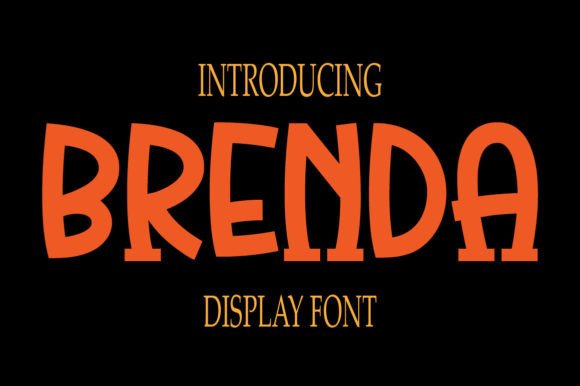
In the landscape of digital design, typography often dictates the emotional tone of a project before a single word is read. Brenda stands out as a fun and unique display font that brings a distinct personality to visual communication. Its quirky character is not merely an aesthetic choice but a functional asset for professionals seeking to inject a cheerful vibe into their work. Whether you are a marketer crafting a campaign, an educator designing a lesson plan, or a small business owner building a brand identity, understanding how to integrate Brenda into your workflow can significantly enhance the impact of your creative output.
Unlike standard serif or sans-serif typefaces designed for body text, Brenda operates within the realm of display typography. This means it is engineered to grab attention at larger sizes, making it ideal for headlines, logos, invitations, and social media graphics. However, treating a font like Brenda as a standalone element often leads to inconsistent results. To truly leverage its potential, one must view it as a component within a broader design process, considering preparation, compatibility, and execution from the very beginning of a project.
Defining the Role of Brenda in Visual Strategy
Before downloading or purchasing any typeface, it is crucial to define where it fits within your specific project goals. Brenda is characterized by its playful strokes and irregular forms, which naturally convey warmth, approachability, and creativity. This makes it an excellent candidate for projects targeting younger demographics, lifestyle brands, educational materials, or events that require a sense of celebration. However, its utility extends beyond simple decoration; it serves as a strategic tool to differentiate content in a crowded digital space.
When planning a design system, Brenda should be categorized alongside other assets such as color palettes, imagery styles, and secondary fonts. It is rarely appropriate for long-form reading due to its decorative nature. Instead, its role is to act as the "hook"—the visual element that stops the scroll or draws the eye to a call to action. Understanding this distinction early in the planning phase prevents common pitfalls, such as using the font for paragraphs of text, which can degrade readability and undermine the professional quality of the final product.
Preparation and Compatibility Checks
Successful implementation begins with preparation. Before integrating Brenda into a project, designers and creators must assess technical compatibility and file integrity. As with many custom display fonts, Brenda may come in various formats, including OpenType (OTF), TrueType (TTF), or web-optimized Web Open Font Format (WOFF/WOFF2). Ensuring you have the correct license for your intended use—whether for personal projects, commercial branding, or web deployment—is a critical step in the procurement process.
Compatibility also involves checking how Brenda interacts with the software tools you already use. Most modern design platforms, such as Adobe Illustrator, Photoshop, Figma, and Canva, support standard font files without issue. However, if you are working within a strict corporate environment with limited font libraries, you may need to embed the font files directly into your assets or export text as outlines to ensure consistency across different devices and operating systems. For web developers, this preparation phase includes testing the font's rendering speed and legibility across various browsers and screen resolutions to maintain a seamless user experience.
Integrating Brenda into the Design Process
Once the technical groundwork is laid, the next phase involves integrating Brenda into the actual creative workflow. The most effective way to utilize this font is through contrast. Because Brenda possesses such a strong personality, it pairs best with neutral, clean typefaces for body copy. A practical approach is to select a simple sans-serif or a highly readable serif font to handle the informational content while reserving Brenda for headlines, pull quotes, and key data points.
This pairing strategy creates a visual hierarchy that guides the viewer's eye naturally. For example, in a marketing email, Brenda might be used for the subject line or the main header to evoke excitement, while the body text remains straightforward and easy to digest. In a presentation deck, Brenda can transform a standard slide title into a memorable focal point, breaking the monotony of corporate templates. The key is balance; too much Brenda can feel chaotic, while too little may render its unique qualities invisible.
During the execution phase, spacing and sizing become critical factors. Display fonts often require more generous leading (line spacing) and tracking (letter spacing) than standard fonts to allow their decorative elements to breathe. When working with Brenda, do not rely on default settings. Adjusting these parameters manually ensures that the quirky details of each character remain distinct and do not clash with one another. This attention to detail is what separates amateur designs from polished, professional work.
Practical Use Cases Across Industries
The versatility of Brenda allows it to serve diverse audiences and industries, provided it is applied with intention. Here are several scenarios where this font excels:
- Brand Identity and Logos: Startups and creative agencies often seek a logo that feels human and accessible. Brenda can form the basis of a logotype that communicates innovation and friendliness, setting the tone for all subsequent brand communications.
- Social Media Graphics: In the fast-paced world of Instagram, TikTok, and Pinterest, visuals must stand out immediately. Using Brenda for overlay text on images or video thumbnails can increase engagement rates by signaling that the content is entertaining and lighthearted.
- Educational Materials: Teachers and instructional designers can use Brenda to make worksheets, certificates, and classroom posters more engaging for students. The cheerful vibe helps reduce anxiety around learning tasks and encourages participation.
- Event Invitations: From birthday parties to community workshops, event invites benefit from a font that conveys celebration. Brenda adds a touch of whimsy that formal scripts or block letters cannot achieve.
- Packaging Design: Small businesses selling handmade goods, snacks, or beauty products can use Brenda on labels to suggest artisanal quality and a personal touch, distinguishing their products from mass-market competitors.
Workflow Efficiency and Quality Control
Maintaining efficiency when working with unique fonts requires organization. Creating a style guide that explicitly defines how and when to use Brenda can streamline collaboration among team members. This document should specify acceptable pairings, minimum font sizes, and contexts where the font should be avoided. By establishing these rules upfront, you reduce the time spent on revisions and ensure that every piece of content maintains a consistent voice.
Quality control is equally important. After drafting a design, review the layout on multiple screens and in print proofs if applicable. Check for kerning issues, particularly between specific letter combinations that might look awkward in Brenda's unique structure. Additionally, verify that the font renders correctly in grayscale, as some decorative elements may lose definition when converted to black and white for certain print applications or accessibility modes.
Long-Term Considerations and Adaptability
While trends in design evolve rapidly, a well-chosen display font like Brenda can offer longevity if used thoughtfully. The key to long-term success lies in adaptability. As your brand grows or your project scope changes, the application of Brenda may need to shift. Perhaps it moves from being the primary headline font to a secondary accent for special announcements. Regularly auditing your design assets ensures that the font continues to serve its purpose effectively without becoming dated or overused.
Furthermore, consider the accessibility implications of your choices. While Brenda is visually striking, ensure that the contrast ratios between the text and background meet accessibility standards. Avoid placing Brenda on busy backgrounds that compete with its intricate details. By prioritizing usability alongside aesthetics, you create inclusive designs that resonate with a wider audience while maintaining the cheerful vibe that defines the font.
In conclusion, Brenda is more than just a decorative typeface; it is a strategic asset that, when integrated correctly into your workflow, can elevate the emotional resonance of your projects. By focusing on preparation, thoughtful pairing, and rigorous quality control, professionals across various fields can harness its quirky personality to create work that is both visually compelling and functionally sound. Whether you are launching a new product, teaching a class, or simply sharing a creative idea, Brenda offers a reliable way to bring joy and clarity to your visual storytelling.