Dinofiles: A Modern Display Font for Memorable Designs
In the crowded world of digital and print design, the right typeface can be the difference between a project that gets noticed and one that fades into the background. Dinofiles has emerged as a standout choice for creators seeking a blend of modern aesthetics and playful charm. This display font is engineered to bring a sense of cuteness and approachability to posters, logos, magazine covers, book titles, and banners. However, like any specialized tool, its power lies not just in downloading it, but in understanding how to wield it effectively. Many designers rush to integrate new fonts without considering the nuances of legibility, context, or pairing, often resulting in designs that feel cluttered or disjointed.
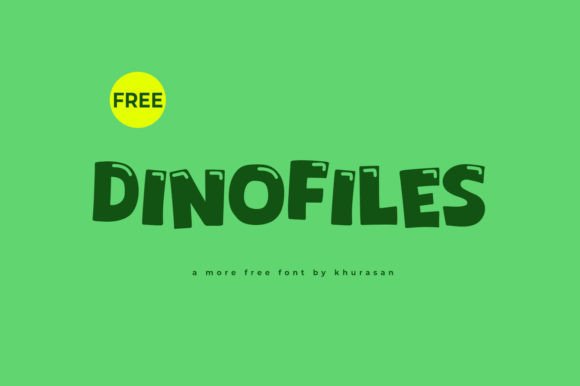
To truly leverage Dinofiles, you must first understand what makes it unique. It is not a workhorse sans-serif meant for body text; it is a statement piece. Its rounded edges, friendly curves, and distinctive character shapes are designed to evoke warmth and creativity. When used correctly, Dinofiles transforms a standard layout into something inviting and memorable. Yet, the very features that make it "cute" can become liabilities if applied indiscriminately. The goal is to use this font to elevate your creative ideas, ensuring they stand out for the right reasons.
Understanding the Limits of Display Typography
One of the most common mistakes I see beginners and even seasoned professionals make is treating display fonts like Dinofiles as all-purpose solutions. There is a tendency to apply a decorative typeface across every element of a design, from the main headline down to the fine print. This approach often leads to visual fatigue. Because Dinofiles is a display font, its intricate details and stylized forms are optimized for large sizes and short phrases. When you shrink it down to read a paragraph of text, the distinct shapes blur together, making the content difficult to digest.
This misunderstanding directly impacts usability and communication. If your audience struggles to read your message because the font was chosen for style over substance, your design has failed its primary function. To avoid this, strictly limit the use of Dinofiles to headlines, subheads, logos, and pull quotes where impact is more important than volume. For body copy, pair it with a clean, neutral sans-serif or serif font that offers high readability. This contrast allows Dinofiles to shine as the focal point while ensuring the rest of your content remains accessible.
The Trap of Over-Decoration
Another frequent error involves over-decorating the font itself. Designers sometimes feel compelled to add excessive effects like heavy drop shadows, outlines, gradients, or 3D extrusions to make the letters pop further. While these effects can work in specific contexts, applying them to an already stylized font like Dinofiles often creates a muddy, chaotic look. The font's inherent personality is strong enough on its own; adding too much visual noise obscures its natural charm.
A better approach is to let the typography breathe. Use white space strategically around the text to give it room to stand out. If you need emphasis, rely on color contrast rather than complex effects. For example, placing Dinofiles in a bold, vibrant color against a soft, neutral background will draw the eye immediately without compromising clarity. This minimalist strategy respects the font's design integrity and ensures your message is communicated clearly and professionally.
Context Matters: Where Dinofiles Shines
Selecting the right environment for your font is just as critical as the font selection itself. Dinofiles is perfect for projects that require a touch of whimsy, friendliness, or modern flair. Think about children's books, lifestyle blogs, event flyers for family gatherings, branding for boutique cafes, or educational materials for young learners. In these scenarios, the font's cute aesthetic aligns perfectly with the intended emotional response.
However, using Dinofiles in contexts that demand strict formality or authority can backfire. Imagine seeing this font on a legal document, a financial report, or a corporate crisis communication plan. The mismatch between the tone of the content and the playfulness of the typeface can undermine credibility and confuse the audience. Before committing to Dinofiles, ask yourself: Does the personality of this font match the message I am trying to convey? If the answer is no, it is better to choose a more traditional typeface to maintain trust and professionalism.
Evaluating Your Project Needs
Before you download or purchase Dinofiles, take a moment to evaluate your specific project requirements. Consider the medium where the design will live. Will it be viewed on a small mobile screen or a massive billboard? On a small screen, the finer details of a display font might get lost, so test the font at various sizes to ensure it remains recognizable. If you are designing a banner for an outdoor event, check that the letter spacing (kerning) is wide enough to prevent characters from merging when viewed from a distance.
Furthermore, consider the longevity of your design. Trends in typography shift, and while Dinofiles has a timeless quality to its rounded forms, overly trendy fonts can date a brand quickly. Ask yourself if this font will still look relevant in two or three years. If you are building a long-term brand identity, ensure that the font supports scalability and versatility across different applications, from social media icons to business cards.
Practical Steps for Successful Implementation
To get the most out of Dinofiles, follow a structured approach to integration. Start by creating a mood board that includes your target audience, color palette, and other design elements. Place samples of Dinofiles within this context to see how it interacts with other visuals. Does it clash with your imagery? Does it complement your color scheme? These preliminary checks save time and resources later in the process.
When you are ready to apply the font, focus on hierarchy. Use Dinofiles for the largest, most important text to establish the tone immediately. Then, introduce a secondary font for supporting information. This creates a clear visual path for the reader's eye. Additionally, pay attention to alignment and spacing. Display fonts often have unique widths and heights; adjusting the tracking (letter-spacing) slightly can improve the overall balance and readability of your headline.
- Test for Legibility: Always zoom out to view your design at actual size before finalizing.
- Limit Usage: Stick to headlines and short phrases to maintain impact.
- Pair Wisely: Combine with simple, readable fonts for body text.
- Check Licensing: Ensure you have the correct license for your intended use, whether commercial or personal.
Finally, remember that good design is about solving problems, not just decorating pages. Dinofiles is a powerful tool in your arsenal, capable of adding joy and personality to your work. By avoiding common pitfalls like overuse, poor pairing, and contextual mismatches, you can ensure that your designs not only look great but also communicate effectively. Take the time to learn the strengths and limitations of this font, and you will find that it becomes an invaluable asset in creating lovely, standout designs that resonate with your audience.